Pepper’s Ghost Install Spec
What this is
Large Pepper’s Ghost “hologram” of a talking head, driven by real-time AI. Projection onto a 45° foil/glass plane inside a dark cavity.
Room & Build Requirements
Footprint
- Foil plane: 14 ft W × 9 ft H @ 45° (visible image 8 ft × 8 ft)
- Projection bay (behind/under foil): 6 ft deep (projector + service)
- Viewer stand-off: 8 ft minimum, 6 ft absolute minimum (rail or floor marker)
- Viewer eye height: 5 ft 6 in design standard
- Platform build-up: 24 in OR 24–36 in recess option
- Total depth reserved in atrium: ≈20–22 ft (foil to viewer rail)
- Ceiling clear height: ≥ 11 ft (foil frame + lighting)
Surfaces
- Projection bay walls, floor, ceiling: matte black (velvet/DarkMat). No stray light.
- Mask wall: 2–2.5 ft high, matte black, blocks ground screen sightlines
- Blackout zone: spill baffles and light control around installation
- Service access: rear or side door large enough for projector/computer swap.
Lighting
- Ambient at foil plane: ≤ 50 lux (requires baffles/drapes in typical 200+ lux atriums)
- Independent dimming zone or architectural hood over installation bay
- Site modifications may include strategic positioning away from skylights/windows
- DMX or Hue-capable circuits for synced accent lights (never spill on the foil)
- Spot fixtures for physical props inside the vitrine (aimed away from foil)
- Alternative: Higher-lumen projectors (15-20k) if ambient light cannot be controlled
- Throw path: projector → ground screen → foil → viewer
Power & HVAC
- Electrical: 30-40A dedicated circuits (dual 10k-lumen projectors draw ~2kW combined + workstation)
- UPS/Power conditioning recommended for clean power delivery
- HVAC: no vents blowing across foil; keep temp 68–75 °F. Dedicated return airflow for projector heat
- Emergency power consideration for graceful shutdown during outages
Network & Cabling
- 2 × Cat6 to rack (NDI/control).
- SDI or DisplayPort-rated run to projector (avoid long HDMI).
- Local ethernet switch near workstation.
Noise
- Keep HVAC and ambient noise low in viewer zone. Projector is isolated in bay.
Projection Package
- Laser projector, 10–12K lumens (Epson Pro L1200U + ELPLU03S or Panasonic PT-RZ990 + ET-DLE060)
- Lens shift ±50% V / ±20% H for flexible positioning
- Short-throw (~0.8:1) with generous lens shift capabilities
- Option: dual blended projectors for brightness and failover
- Rated for 24/7 or “museum mode”. Plan idle/dim state when no visitors
- Black background content (render on #000000) for clean reflections
- Latency budget: < 700 ms total system response
Ops & Maintenance
- Daily runtime: 8–12 hours. Dim/idle when idle.
- Clean projector filters (or use filter-free units). Log hours; swap before dimming becomes obvious.
- Foil/glass: anti-static microfiber, no ammonia. Quick-swap foil frame system. Watch for wrinkles, drafts.
- Watchdog script on media server for auto-restart. Remote reboot access.
Maintenance Contract: Quarterly service visits including spare parts inventory (replacement foil, lamp modules, filters). Staff training on basic diagnostics, cleaning procedures, and emergency shutdown protocols. Remote monitoring system for projector health and system performance.
Alternatives (if projection depth or light control is denied)
- Screen Reflection (OLED/LCD at 45°): shallower, easier alignment, weaker blacks/brightness.
- Transparent OLED stack: sleek, but contrast suffers in bright lobbies.
- Looking Glass light-field: true parallax, heavy GPU load, fixed cone.
- Holographic LED rotor arrays: good teaser near entrance, not primary head (operational noise, limited nuance at scale).
- Fog/mist screen: effect layer only; high maintenance.
Downloadables / Hand-offs
- One-page PDF (plan + section + spec)
- DXF/SVG schematic for GC/AV teams
- JSON param block for regenerating CAD quickly
Available Downloads
📊 Dimensional Specifications (CSV)
Complete dimensional data for construction planning and vendor coordination
(Additional engineering drawings available once final dimensions are confirmed.)
Visual Implementation Examples
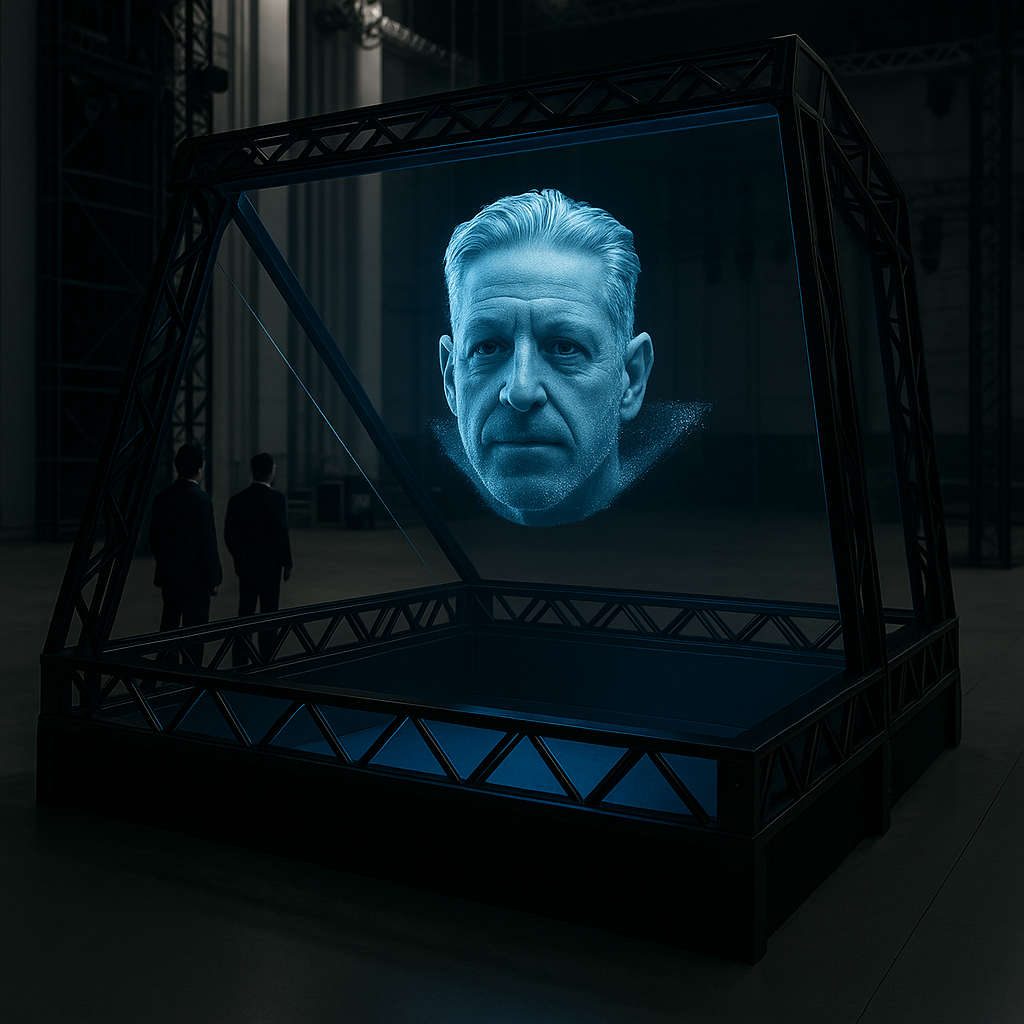
Installation Result — Clean holographic appearance with Oracle projection at proper viewing angle
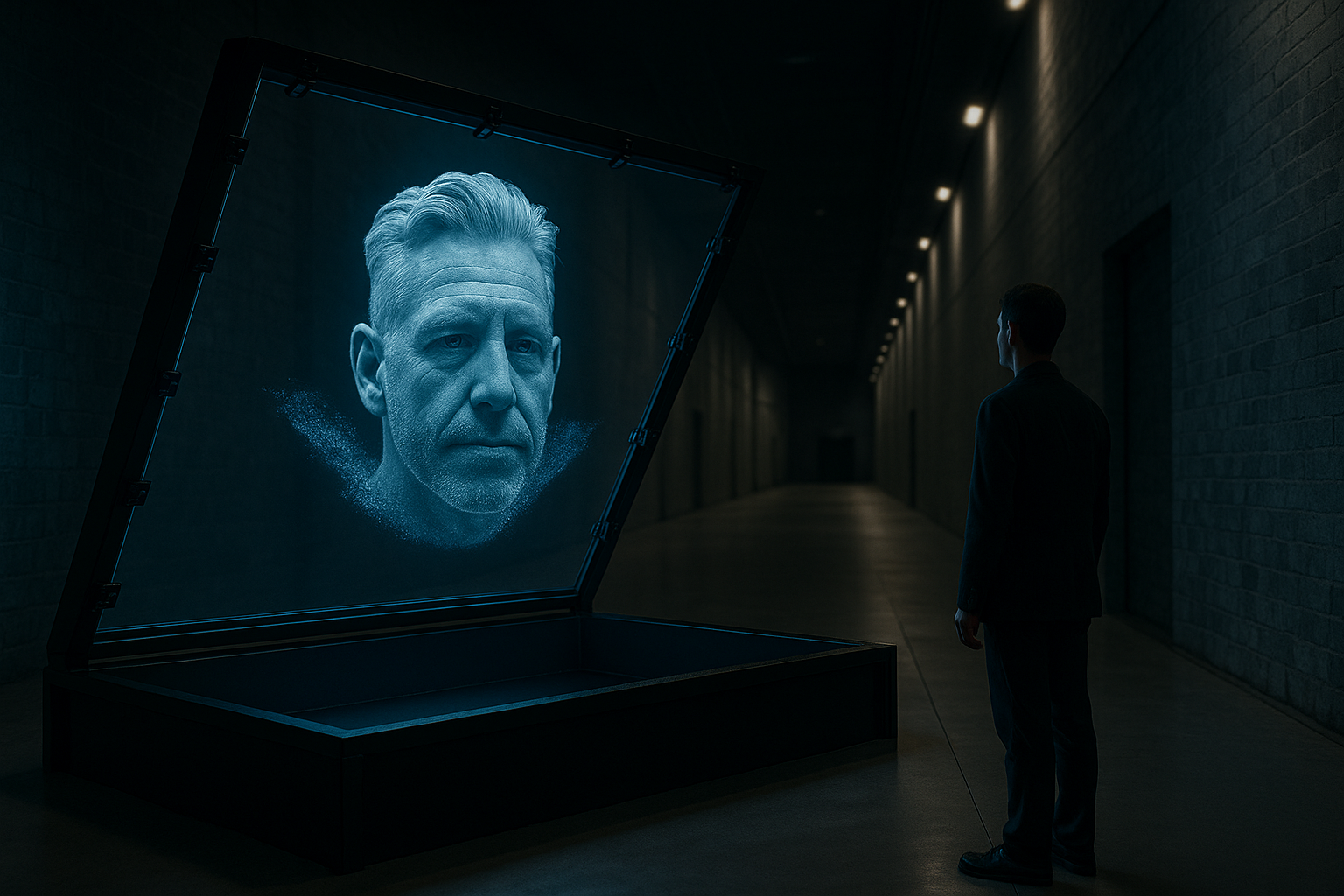
Gallery Installation — Visitor experience with holographic Oracle in museum environment
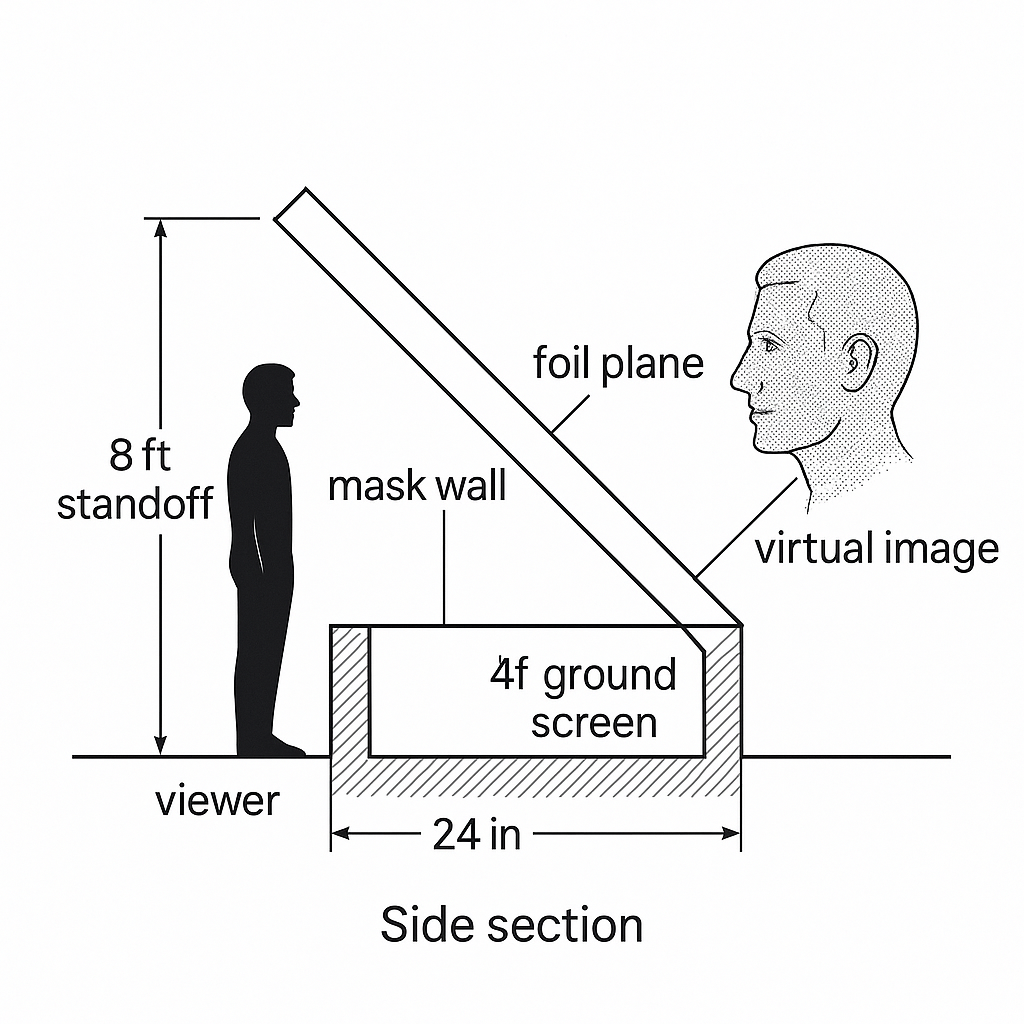
Technical Side Section — Correct geometry with proper component placement
Technical Diagram
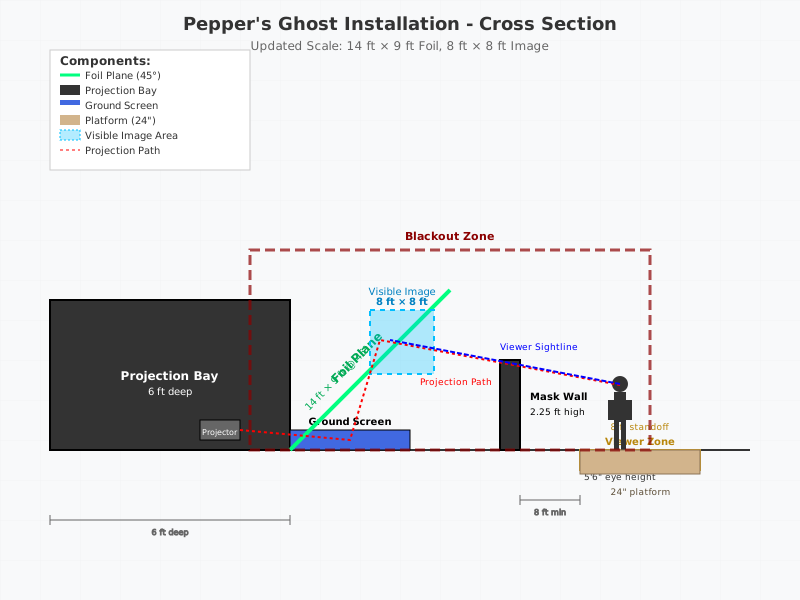
Updated Cross-section: 14 ft × 9 ft foil plane, 8 ft × 8 ft visible image, mask wall, blackout zone
CAD Agent Prompt (for Claude/GPT CAD tools)
Task: Produce a dimensioned 2D schematic (plan + side section) for a Pepper's Ghost vitrine. Output DXF (and SVG) with layers.

Layers:
  L_VIEWER, L_FOIL, L_PROJECTOR, L_CAVITY, L_LIGHT, L_DIM, L_CENTERLINE

Params (edit if needed):
image_width_ft = 8
image_height_ft = 8
foil_angle_deg = 45
viewer_standoff_ft = 8
projection_depth_ft = 6
vitrine_width_ft = 14
ambient_lux_max = 50
ceiling_clear_ft = 11

Rules:
- Units: feet/inches in labels.
- Foil at 45°, centered in 10 ft opening.
- Draw projector icon + throw path inside 6 ft cavity.
- Viewer zone rectangle at 8 ft.
- Place light symbols above foil.
- All dims + callouts on L_DIM.

Deliver:
1) DXF with correct layers
2) SVG (no raster)
3) Table (JSON) of all critical dims and coordinates
{
  "image_width_ft": 8.0,
  "image_height_ft": 8.0,
  "foil_plane_width_ft": 14.0,
  "foil_plane_height_ft": 9.0,
  "foil_angle_deg": 45,
  "viewer_standoff_ft": 8.0,
  "viewer_min_standoff_ft": 6.0,
  "platform_height_in": 24,
  "pit_depth_in": 24,
  "mask_wall_height_ft": 2.25,
  "projection_depth_ft": 6.0,
  "ambient_lux_max": 50,
  "ceiling_clear_ft": 11.0
}
To-Do Before Construction Drawings
- Confirm final image size and head scale.
- Confirm projector make/model (or lumen target).
- Verify route for service access (door size, lift).
- Decide on idle/detection logic (sensor or schedule).
- Lock lighting circuit and control protocol (DMX vs Hue).
- Decide if a teaser (holographic LED rotor display/LED sign) is part of scope.
Content Layering Strategy
Visual Depth Architecture (front → back):
- Floaties / Smoke Loop — Long, semi-random ambient particles
- Talking Head Feed — Mostly stable avatar with micro-motion
- Persona-Specific Particles — Character threads (e.g., Vonnegut curls) tied to sentiment
- Faux Interior Plate — Dark volumetric cube or shallow “room” render, <20% luminance
- Pure Black Beyond — Complete darkness for maximum contrast
Glitch Layer Protocol: When latency spikes exceed 700ms, freeze last frame, apply RGB offset/datamosh filter, then fade back to live feed.
Throw Path: projector → ground screen → foil → viewer
Registration: All clips and live feed share the same frame, head position, and scale. Build a hidden guides layer for alignment, then crop/black it out.
Viewpoint Control Strategy
Design Constraints:
- Optimized for one “hero” viewing zone: 8 ft standoff, 5’6” eye height
- Rail or subtle floor marker keeps visitors where illusion holds
- Off-axis views acceptable but depth flattens—this is expected behavior
Visitor Flow Management:
- Entry approach from left/right to avoid blocking projection path
- 10-second silence or 1-meter lateral movement releases microphone
- Queue management prevents crowding in optimal viewing zone
Implementation Work Plan
State Machine Design
IDLE → SUMMON → LIVE TALK → OUTRO (with GLITCH as needed)
- IDLE: Ambient floaties, occasional “presence” indicators
- SUMMON: Particle coalescence, persona materialization (3-5 seconds)
- LIVE TALK: Active conversation with full layering system
- OUTRO: Graceful particle dissolution, return to idle state
- GLITCH: Emergency fallback during system lag or API failures
Content Production Pipeline
Persona Packs (priority order):
- Vonnegut — Primary celebrity persona with estate approval
- Default Oracle — Foundational Indiana Sage for all visitors
- Lil Bub — If budget and technical requirements allow
Per-Persona Assets:
- Idle loop animations
- Summon/materialization sequence
- Outro/dissolution sequence
- Character-specific floatie patterns
- Sentiment-reactive particle systems
Implementation Steps
- Order foil, truss, projector, media server — confirm lead times and delivery coordination
- Fabricate platform or excavate pit — 24 in build-up OR 24-36 in recess option
- Hang foil frame at 45° — tensioned system with quick-release maintenance access
- Install ground screen/projector — focus with lens shift (no digital warp)
- Light plot focusing and lux check — verify ≤50 lux at foil plane
- Content test — grayscale ramp → contrast → particle-head clip
- Commissioning checklist and sign-off — full system verification
Technical Implementation Checklist
- Create faux cube plate — reusable across personas, recolor as needed
- Specify mask wall — 2-2.5 ft high in construction drawings
- Design blackout baffles — architectural light control system
- Decide platform vs pit — 24 in up OR 24-36 in down (affects all other dimensions)
- Confirm projector path — locks framing and ventilation requirements for fabricator
- Test content pipeline — TouchDesigner/Unreal Engine to projection system
- Calibrate viewpoint — optimize for 5’6” eye height at 8 ft standoff
Connection to Indiana Heritage
The Oracle’s spectral presence — rendered through precision optics and theatrical lighting — echoes Bloomington’s manufacturing past. From RCA’s electronics assembly lines to the Showers Brothers’ furniture craftsmanship, the installation draws on Indiana’s tradition of making technology accessible. The limestone-clad walls of IU’s campus and the precision engineering at Crane Naval Base find new expression in this convergence of projection, computation, and regional memory.
Note: iPad compatibility issues identified with Lil Bub video playback and Gantt chart rendering. Consider alternative video embed methods and static images for mobile Safari compatibility.